

Overview
Yelp Food Allergies Filters
Around 10% of America’s population (~33 million people) has food allergies. To put that into perspective that’s around 1 in 10 adults and 1 in 13 children. Around half of these allergies have led to severe reactions in both children and adults. Severe food allergy awareness is also a growing need since they are on the rise. Diagnoses for anaphylactic food reactions have risen 377% between 2007 to 2016.
Yelp currently has 76 million active users and by catering more towards people with severe food allergies they can increase their user base by upwards of 43%. Additionally, these users would likely be loyal and consistent users since they would be relying on the app not only for convenience but to potentially avoid life threatening situations. By expanding filters to include specific allergen data, Yelp can transform from a general discovery tool to a vital safety resource for millions!
There are currently existing apps that help users with severe food allergies that we have come across like Beli and FindMeGlutenFree but we found that they lack specific, detailed allergen data. When looking at Beli, we saw that they had a filter feature for specific dietary restrictions and allergens but we found that the way they filter for these restrictions is by combining the filtering with general cuisine types making it very presumptive. On the other hand, FindMeGlutenFree works by gathering other users input only meaning there is no guarantee that the information is correct. Another pitfall we found is that it only focuses on one allergen (gluten) making it less accessible to others with multiple or different allergies. The way our solution is unique is because it provides concrete information straight from the source (the restaurant itself). It will also be very organized and specific which Beli and FIndMeGlutenFree lack so that users can efficiently find which foods and establishments they can eat at.
Discover
Our User Research Findings
We found that the process for people with severe food allergies going to eat out is a tedious, stressful, and daunting process. For starters, the stakes are very high. There's the potential for things like cross-contamination, and the risk of a life threatening allergic reaction. Due to these stakes, people with severe food allergies have to do their due diligence by having to manually call establishments and make sure the place is safe to eat at which is not convenient. The current process they have to use is by looking 1. Looking up the restaurant's menu online 2. Calling the establishment directly and hoping they pick up 3. Asking the waiter if the foods are allergy safe 4. The waiter then has to ask the chefs about the preparation process to ensure that it is allergy safe. This long and tedious process is then repeated until a restaurant is safe to eat at. One specific example is that when her and her friends are looking for a place to eat out and can’t find one, it makes her and her friends feel bad, it is overall a negative experience.
Based on these findings we came up with this problem statement: People with food allergies need to easily identify which establishments and menu items are safe for them when looking to eat out, in order to avoid unsafe foods, and to spend more time actually enjoying the meal and experience.
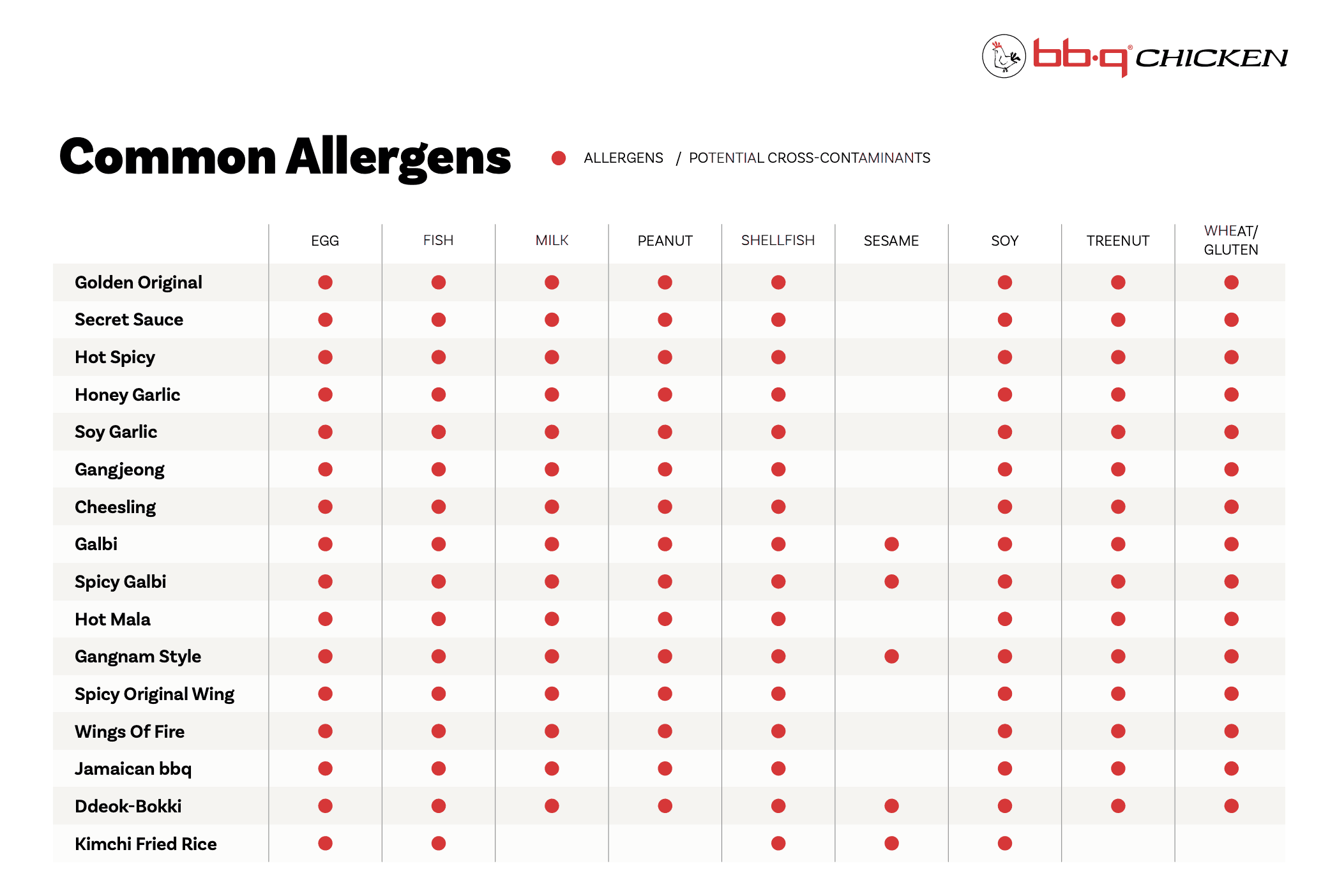
One valuable finding we found is that some restaurants have allergen menus which directly show which items have what allergens. Below is an example of a sophisticated allergen menu. This tells us that having a new standard for allergy safety is actually feasible since some restaurants are already doing it. It also gives us a template for what we can use to organize our allergy information for our users.
Define
Hi-Fi Prototypes
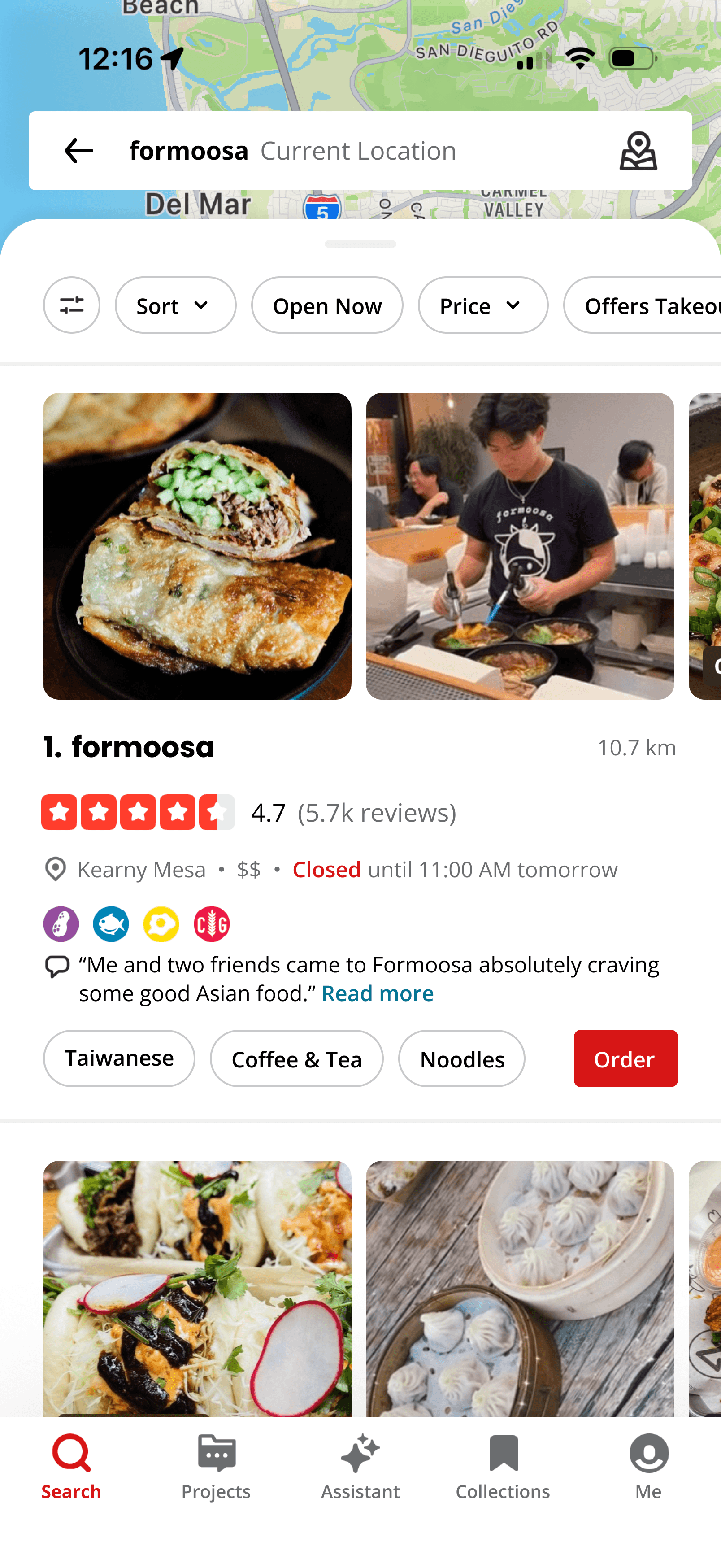
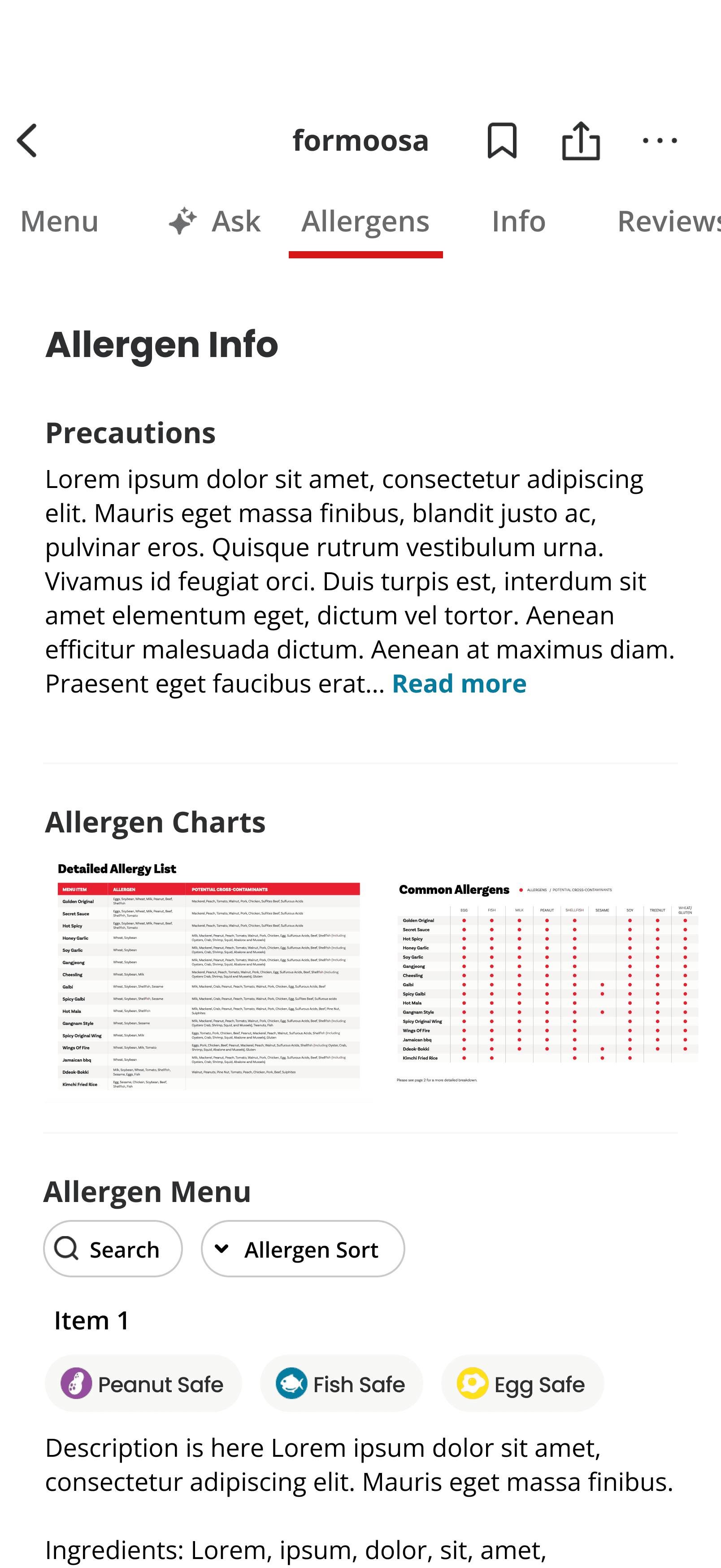
Based on our user research findings we decided to recreate two main screens: the search page andf the restaurant homepage and create a new allergen section page. The main thing we changed with the search page is adding allergy badges to the section of the restaurant so that users can see what to avoid at a glance. If they want more details or a re confused as to what the allergy badges mean. they have the ability to click on any given restaurant and will be able to see more information about the badges on the restaurant's homepage. As you can see we clearly labelled each allergy badge to show what they mean on the homepage. Finally, we created a new allergen section page where users can click on the new allergen tab on the restaurant homepage which will give them even more specific information about the allergen policies at any given restaurant. In general our rationale was to get more and more specific the deeper the user goes. In the beginning, users can see what to avoid at a glance, then can see more specific information about what the allergen badges mean on the next screen then see specific allergen policies for the restaurant in the next screen. The idea is that the more the user is curious, the deeper and more effort they will put into finding the exact information. This way the format is cleaner as well because it doesn't take up as much space in the beginning and overwhelm the user.
Seach Page

Restaurant Homepage
Allergen Section Page
Develop
User Testing:
Methods
For our user testing, we interviewed two of the people we interviewed for our initial user research. Participant 1 is a 29 year old woman with Celiac disease, thus resulting in her need to avoid all gluten and gluten contamination. We found this user test participant through one of our groupmates, as our participant is her sister. We interviewed this participant over zoom, sharing with her the link to our prototype, and asking her to screen-share as she navigated through. Participant 2 is a senior in college with multiple food allergies including red meat, nuts, and some fruits. In our user testing, we showed our participants all of our prototypes, and asked them to navigate through noting their observations and thoughts as they went.
Results
The main problem we identified based on our user research findings is with our allergy badge icons. We believe that we have to change this specific feature because there is a disconnect between what the participants interpreted them to represent and what we intended them to represent. The disconnect is there because our users found that the allergy badge icons indicated that the restaurant contained that allergen while in reality, we intended it to mean that the restaurant was free from that allergen. Moving forward, we believe our direction should be to either change the meaning of the icons badges and what they represent or clarify the communication of these icon badges by creating new ones.
Reflection
Based on our user research testing, we decided that going forward we would make changes to the allergy badge icons while keeping a similar design for the rest of the screens. For the allergy badges, we will keep them only for the allergen chart/menu area as “this contains” icons. For the badges on the restaurant home page and the search page, we will make new badges that signify “this restaurant is completely free from…” and these badges will only be used for restaurants that can guarantee no cross contamination (ie. a vegan restaurant that doesn’t have ANY dairy or egg products in their facility). Additionally, we decided that we would create a new icon that indicated that there was potential cross contamination.
Deliver
Before and After:
Allergen Badge Functionality
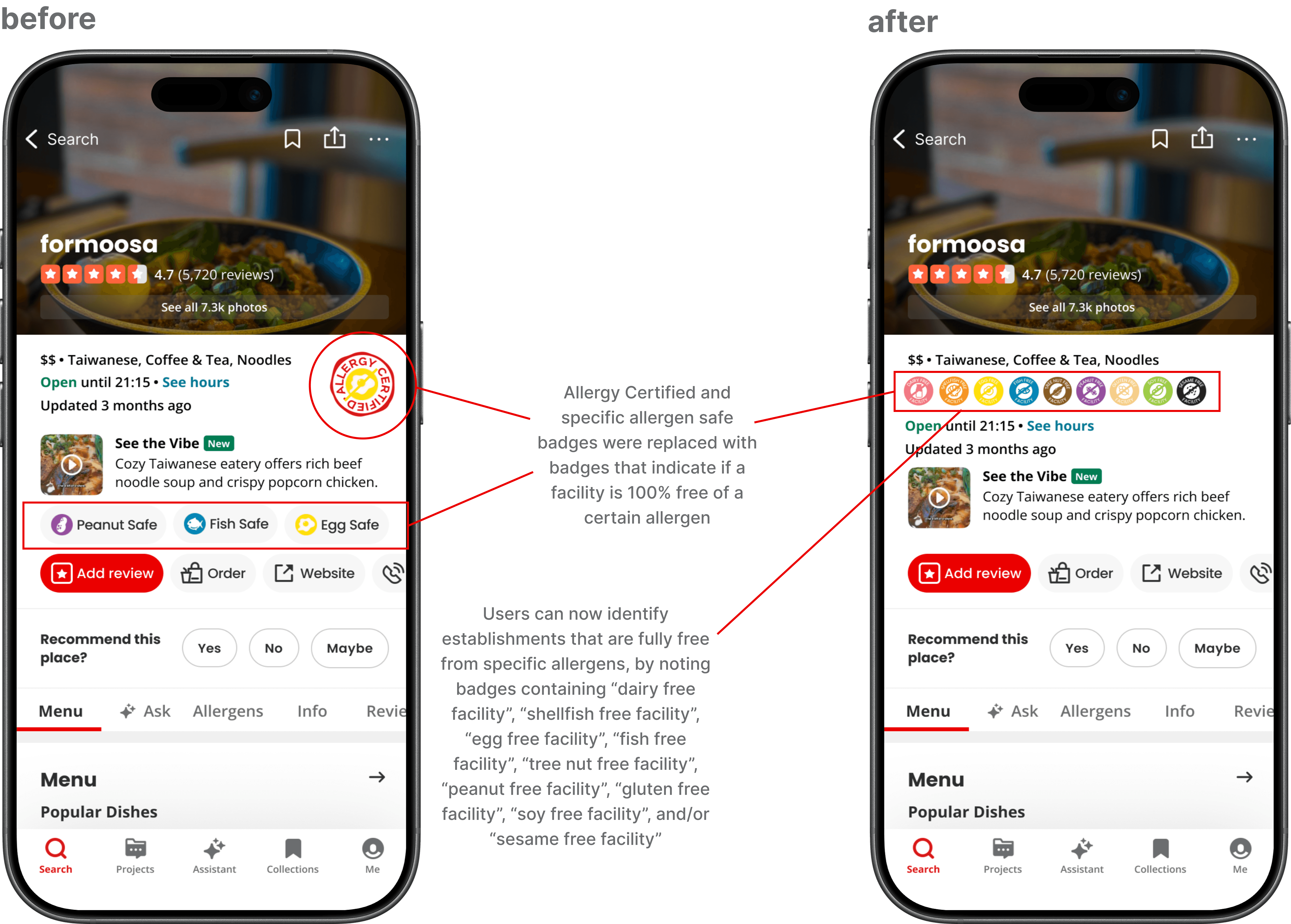
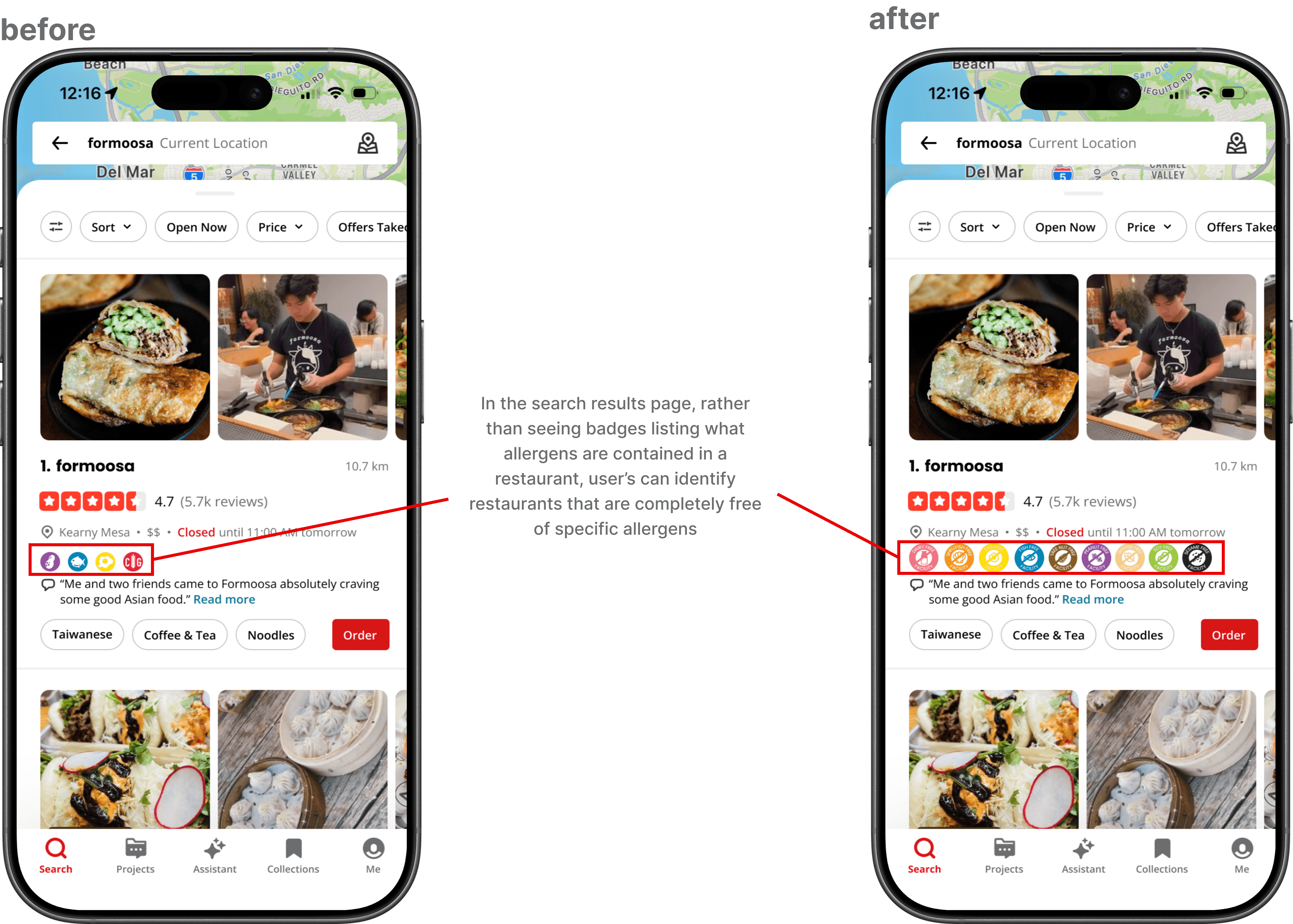
The two before-and-after comparisons below illustrate the adjustments made to the allergen badges made after user feedback. In our first iteration, we implemented “allergy certified” badges to indicate if an establishment was certified to be safe for a particular allergy. There were also badges stating “peanut safe”, “fish safe”, etc., indicating to users if a restaurant claimed to be safe for those particular allergies. Feedback from users with severe food allergies informed us that those badges were confusing, as it was unclear if they indicated whether a restaurant contained a given allergen or was completely free from it. Additionally, it was made clear that liability-wise, it would be difficult to get restaurants to claim they are safe for a certain allergy, unless the establishment is completely free from the given allergen. Given all of this feedback, we removed both of those badges, and created completely new ones. These new badges state whether the establishment is 100% free from a particular allergen, so that users can identify opportunities for absolutely no cross contamination. These badges display symbols that illustrate a particular allergen, and read “peanut free facility”, “fish free facility”, etc. These new badges, if applicable to a particular restaurant, will be displayed on the search results page in the restaurant’s brief description, and on the restaurant’s main page. Additionally, in our redesign, in a restaurant’s initial setup of their yelp page, they will receive prompts of what allergies they can accommodate. When a user filters their search for a particular allergen, results will show only the restaurants that have self-reported to accommodate that allergy. The specific badges we created will solely provide further insight on which establishments are completely free of an allergen, rather than indicating which restaurants claim to be safe for that allergy. The two before-and-after images below illustrate these changes. (A note that the restaurant displayed with the allergen badges is just an example to illustrate how the badges look, and is not reflective of the actual allergens the restaurant can accommodate.)
Allergen Menu Revisions
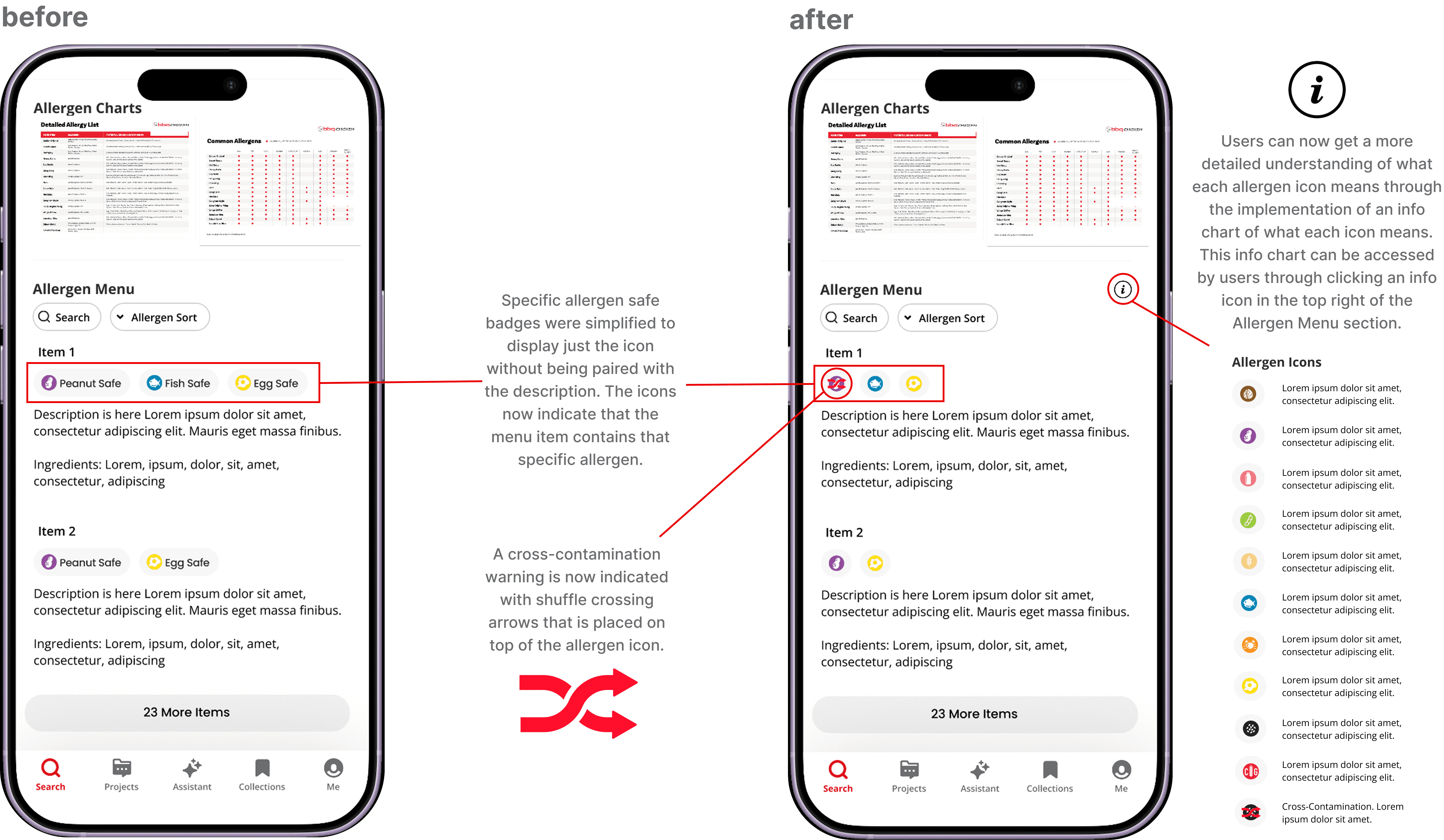
Displayed below is a before and after diagram showing the changes and updates to the Allergen Menu within the Allergen Section redesign that is within the restaurant homepage. In the first design of the Allergen Menu section, the screen directly shows each food item paired with those badges and also with a short description and ingredient list. Each menu item is paired with an allergen icon that means that the food item is free of that allergen. Through user testing and feedback, users initially thought that the allergen icons meant that the item contains that allergen, not what we had initially designed for the icon to represent. Even paired with the “Peanut Safe” description with the icon, users relayed that intuitively, having food items paired with these allergen icons made more sense for the icons to signify that the food item contains the allergen. Thus, in the redesign of the Allergen Menu section after user testing, we simplified the design of the allergen icon to display only the icon without it being paired with the description. The icons now intuitively indicate that the menu time contains the specific allergen. Additionally, since the icons are no longer paired with a direct definition of what the icon is signifying, we added a “more info” icon that users can now click to get a more detailed understanding of what each allergen icon means. Through clicking the “more info” icon, an info chart opens up to display what each allergen icon means with the icon and description displayed. With this implementation, users are able to gain quick access to a chart that describes every icon without cluttering the main page of the Allergen Menu section. Additionally, to address the concern of cross-contamination, we added another icon type that uses shuffle crossing arrows that is placed on top of an allergen icon to indicate that there is potential cross-contamination within this menu item that users are able to immediately visually notice the warning through the bright-red color and the placement in front of the allergy icon. With this, the two before-and-after images below illustrate these changes.